Chrome Extension for Subtitle Translation
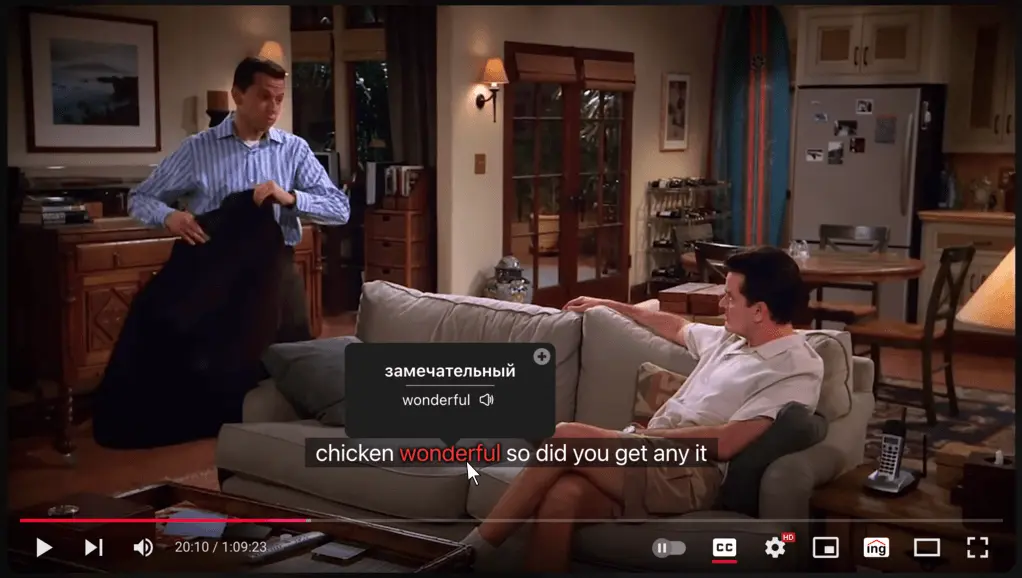
Enhance your language skills while watching videos on Netflix, YouTube, Coursera, Udemy, Amazon Prime Video, or your own local files. Simply hover over any subtitle word for an instant translation. Built by the team behind Dictionarying.
Key Features
Customize Subtitles
You can drag subtitles on the screen and place them in the best possible location.
You can customize subtitles by changing the font size and the background of the subtitles.
If a video lacks subtitles, you can add your own, and they'll display as native to the platform.
Amazing tool for watching shows in other languages! Super easy to use and the instant hover-translations make understanding foreign subtitles a breeze. Perfect for language learners and binge-watchers alike.
 Xman
XmanThis extension works exactly as promised — instant hover translations make understanding dialogues so easy. Now I can enjoy international content without struggling with language barriers. Love it.
 Harrison
The application demonstrates smooth performance coupled with a lightweight design. Well done to the development team.
 Ivan
IvanFinally a subtitle tool that isn’t buggy. Works great on Netflix and YouTube.
 Larry Jonathan
A good application that really works as described, and most importantly, everything is clear and without glitches.
 Мартин
Exactly what I needed for language learning and streaming, translate subtitles seamlessly and works with my favorite shows. smooth and intuitive
 Ekko Arcane
The authors are present and responsive, which I think is very important.
 Дмитро Лень
Very handy! Is it possible when clicking on a word to have a floating windows over the movie tab than a new full screen tab?
 Nikos Kalousis
Privacy & Permissions FAQ
- The extension requests only essential permissions: Active Tab (to interact with the current page), Scripting (to inject subtitle translation features), Storage (to save your preferences), and Host Permissions (to access supported websites and translation APIs).
- The extension accesses subtitle text on supported platforms (like Netflix or YouTube) to provide translations, as well as your local settings such as selected language and preferences.
- No, the extension does not collect any personal data such as your name, email, identity, passwords, or sensitive input. It also does not track your browsing history outside supported websites.
- No, the extension does not store your subtitle data. Translations are processed in real-time, and subtitle text may be sent to third-party translation services (such as Google Translate) only to generate translations.
- Data is used strictly to provide the core functionality of the extension—translating subtitles and saving your preferences. No data is used for tracking, advertising, or selling to third parties.
- Yes, most of the extension’s functionality runs locally in your browser. External requests are minimized and only used when necessary for translation services.
- Yes, you can view and manage all permissions at any time through your browser’s extension settings, including restricting site access.
Part of a Larger Platform
The Dictionarying extension is one piece of a broader pronunciation platform combining native-speaker audio, acoustic analysis, and articulatory animation — showing learners not just how a word sounds, but how it is physically produced. The approach is grounded in peer-reviewed phonetic research and built by a team with a track record in language education at scale. Meet the team and methodology →
Frequently Asked Questions
- You can use the extension to learn vocabulary by hovering over any word in the subtitles to get an instant translation. You can also track your vocabulary progress and review words you have looked up in the learning mode.
- Dictionarying Chrome Extension supports Netflix, YouTube, Coursera, Udemy, Amazon Prime Video, and local video players.
- Yes, the extension tracks your vocabulary progress and allows you to review words you have looked up in the learning mode.
- Yes, the Dictionarying extension is completely free to download and use. You can access all core features like hover translations and automatic pausing without a subscription.